

Intel HX-CPU and GeForce RTX 3080 Ti. The Lenovo Legion 7 16 offers everything that gamers desire. In addition to the fastest mobile processor from Intel, there is also the GeForce RTX 3080 Ti and a fast 165 Hz display. The cooling system also manages to keep the hardware cool, but at 4,499 Euros (~US$ 4,500), the high-end gamer is by no means a bargain.
The Legion 7 16 is Lenovo’s gaming flagship in a 16-inch format and offers everything that is currently available on the market: an Intel HX CPU, a GeForce RTX 3080 Ti, a WQHD panel with 165 Hz, and up-to-date PCIe 4.0 SSDs. However, this also comes at a price, as Lenovo charges the hefty sum of 4,500 Euros (~US$4,500) for the high-end gamer. In this review, we compare the new Legion 7 16 to the gaming competition, which mainly consists of 17-inch models, and also to the Legion 7 16 with AMD hardware.
Processor
Intel Core i9-12900HX 16 x 1.7 – 5 GHz, 165 W PL2 / Short Burst, 136 W PL1 / Sustained, Alder Lake-HX
Memory
32 GB
, DDR5-4800, Dual-Channel, 2x 16 GB, max. 64 GB
Display
16.00 inch 16:10, 2560 x 1600 pixel 189 PPI, NE160QDM-NY1, IPS, glossy: no, 165 Hz
Mainboard
Intel HM670 (Alder Lake-S PCH)
Soundcard
Intel Alder Lake-S PCH – cAVS (Audio, Voice, Speech)
Connections
3 USB 3.0 / 3.1 Gen1, 1 USB 3.1 Gen2, 2 Thunderbolt, USB-C Power Delivery (PD), 1 HDMI, 3 DisplayPort, Audio Connections: 3.5mm, 1 Fingerprint Reader
Networking
Realtek RTL8125 2.5GBe Family Ethernet Controller (10/100/1000/2500MBit/s), Killer Wi-Fi 6E AX1675i 160MHz Wireless Network Adapter (a/b/g/n = Wi-Fi 4/ac = Wi-Fi 5/ax = Wi-Fi 6), Bluetooth 5.2
Size
height x width x depth (in mm): 20 x 358 x 263.5 ( = 0.79 x 14.09 x 10.37 in)
Battery
99 Wh Lithium-Polymer, 4-cell
Operating System
Microsoft Windows 11 Home
Additional features
Speakers: Stereo, Keyboard: Chiclet, Keyboard Light: yes, 24 Months Warranty
Weight
2.567 kg ( = 90.55 oz / 5.66 pounds), Power Supply: 1.058 kg ( = 37.32 oz / 2.33 pounds)
Note: The manufacturer may use components from different suppliers including display panels, drives or memory sticks with similar specifications.
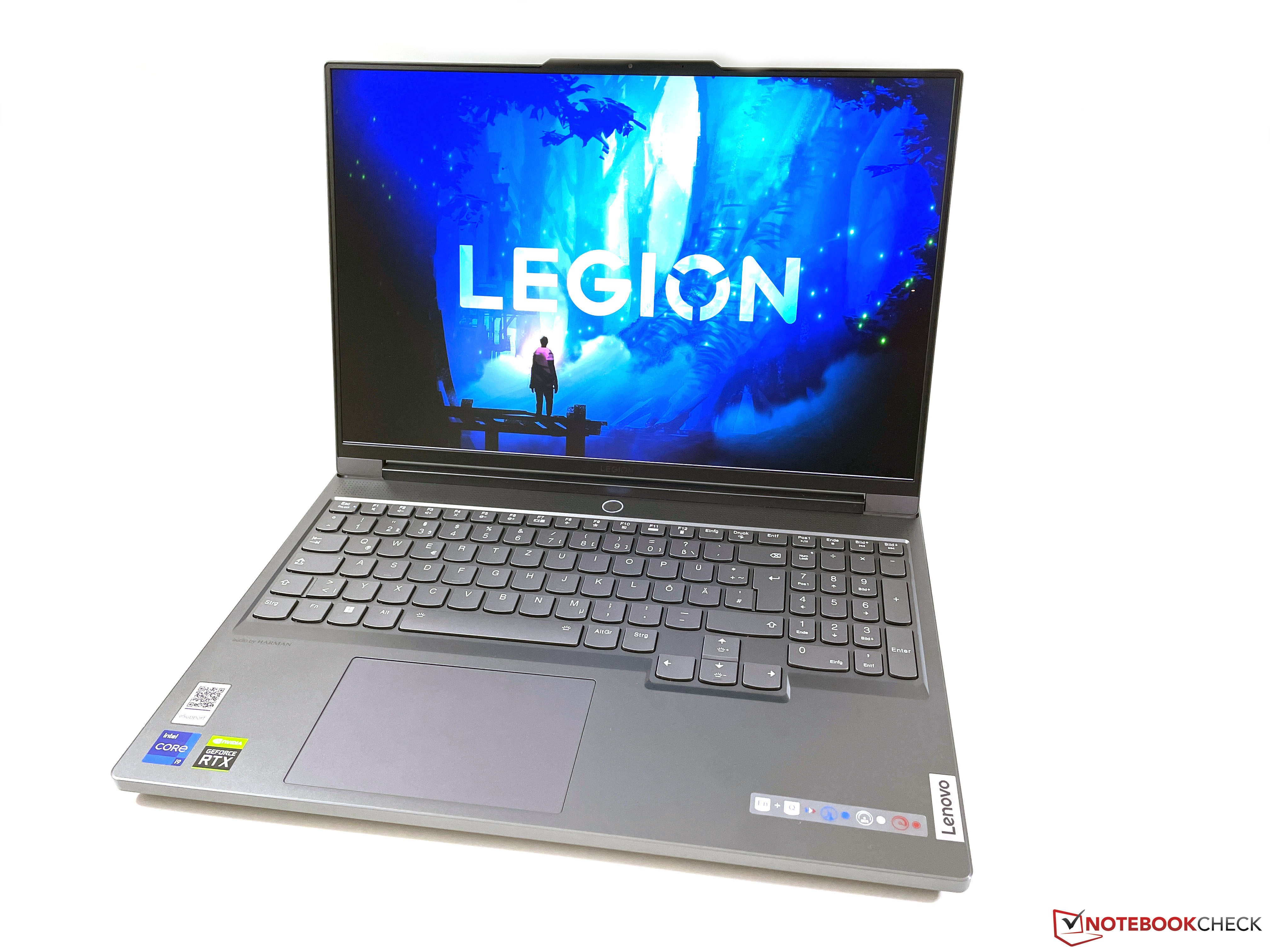
With its silver-gray aluminum chassis, the Legion 7 16 is visually rather discreet for such a powerful gaming laptop. We really like the restrained design and the stability is excellent. Neither the base unit nor the display lid can be dented or twisted, and creaking noises are completely absent. The screen’s edges are very thin and the device looks very modern.
Although the screen hinge is slightly offset at the front, it allows for a maximum opening angle of 180 degrees. The display can also be easily opened with one hand and teetering is not an issue. Selective applications of pressure did not result in any image distortions.
The discreet appearance quickly becomes a thing of the past as soon as the extensive case lighting comes on. In addition to a circumferential light bar in the front area of the base unit, light effects also come out of all fan grills and the Legion logo on the lid is also illuminated. A total of seven different profiles are available, but you can also adjust everything manually.
Together with the two 16-inch models from Asus, the Legion 7 16 is one of the most compact models in the comparison field. At 2.6 kg, it is not a lightweight in itself, but most competitors are a little heavier here as well. However, you shouldn’t forget the bulky 300-watt power adapter, which is heavier than some ultrabooks at more than one kilogram.
The Legion offers plenty of up-to-date interfaces, most of which are located on the back. On the base unit’s upper side are helpful labels that make plugging in cables much easier. We would have liked a standard USB-A port on the sides (e.g. for USB sticks) as well as a card reader, for which there is actually plenty of space.



In addition to the fast 2.5 Gbit/s Ethernet port, the Legion 7 16 also offers a very modern WLAN module (Wi-Fi 6E) which includes support for modern 6 GHz networks as well as Bluetooth 5.2. In our standardized WLAN test with our Asus reference router, the Killer AX1675i achieves very high and stable transfer rates, and we were able to connect to the 6 GHz network without any problems.
| Aorus 17X XES Intel Wi-Fi 6E AX211 |
|
| Lenovo Legion 7 16IAX7-82TD004SGE Killer Wi-Fi 6E AX1675i 160MHz Wireless Network Adapter |
|
| MSI Titan GT77 12UHS Killer Wi-Fi 6E AX1675i 160MHz Wireless Network Adapter |
|
| Average Killer Wi-Fi 6E AX1675i 160MHz Wireless Network Adapter (1461 – 1723, n=5) |
|
| Average of class Gaming (1260 – 1857, n=11, last 2 years) |
|
| Lenovo Legion 7 16ARHA7 MediaTek RZ616 |
|
| Asus ROG Zephyrus Duo 16 GX650RX MediaTek Wi-Fi 6E MT7922 160MHz Wireless LAN Card |
|
| MSI Titan GT77 12UHS Killer Wi-Fi 6E AX1675i 160MHz Wireless Network Adapter |
|
| Razer Blade 17 Early 2022 Killer Wi-Fi 6E AX1690i 160MHz |
|
| Average Killer Wi-Fi 6E AX1675i 160MHz Wireless Network Adapter (1569 – 1714, n=5) |
|
| Average of class Gaming (685 – 1748, n=32, last 2 years) |
|
| Schenker XMG Neo 17 M22 MediaTek RZ608 |
|
| Asus ROG Zephyrus Duo 16 GX650RX MediaTek Wi-Fi 6E MT7922 160MHz Wireless LAN Card |
|
| MSI Titan GT77 12UHS Killer Wi-Fi 6E AX1675i 160MHz Wireless Network Adapter |
|
| Average Killer Wi-Fi 6E AX1675i 160MHz Wireless Network Adapter (1330 – 1617, n=3) |
|
| Average of class Gaming (740 – 1695, n=27, last 2 years) |
|
| Schenker XMG Neo 17 M22 MediaTek RZ608 |
|
| Lenovo Legion 7 16IAX7-82TD004SGE Killer Wi-Fi 6E AX1675i 160MHz Wireless Network Adapter |
|
| Aorus 17X XES Intel Wi-Fi 6E AX211 |
|
| Lenovo Legion 7 16ARHA7 MediaTek RZ616 |
|
| Average of class Gaming (1348 – 1655, n=10, last 2 years) |
|
| MSI Titan GT77 12UHS Killer Wi-Fi 6E AX1675i 160MHz Wireless Network Adapter |
|
| Average Killer Wi-Fi 6E AX1675i 160MHz Wireless Network Adapter (1348 – 1655, n=4) |
|
; iperf3 transmit AXE11000 6GHz: Ø1655 (1613-1702)
; iperf3 receive AXE11000 6GHz: Ø1723 (1681-1736)
Lenovo installs a 1080p webcam in the upper display frame, which can be deactivated with a switch on the right side of the case. Image quality is slightly better than the 720p modules. Overall, the webcam serves its purpose. There is no IR sensor for facial recognition via Windows Hello.
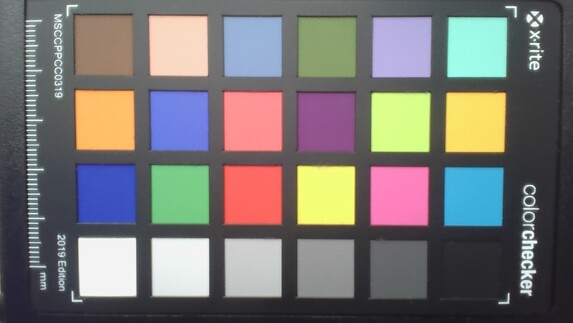
18.3 ∆E
17.5 ∆E
18.8 ∆E
19.6 ∆E
14.8 ∆E
14.4 ∆E
17.9 ∆E
17.3 ∆E
18.1 ∆E
13 ∆E
15.5 ∆E
17.3 ∆E
8.2 ∆E
17.3 ∆E
22.8 ∆E
15.2 ∆E
17 ∆E
15.7 ∆E
0 ∆E
9.4 ∆E
11.9 ∆E
10.2 ∆E
6.2 ∆E
4.6 ∆E
The baseplate is fastened with six Phillips screws and still remains very tight after loosening the screws, which is why it is best to use a suction cup to loosen the baseplate. Inside, the fans can be cleaned and you have access to the two RAM slots, the WLAN module and the two M.2-2280 SSD slots. However, additional covers have to be removed for this, some of which are also screwed.
The keyboard with the dedicated numeric keypad offers decent quality overall with sufficient key travel, but there is still room for improvement. The keys sometimes seem a little rickety, while the space bar and Enter key are relatively loud. Other gaming laptops are slightly better here. There is no criticism for the keyboard illumination, which can be configured individually for each key and you can let your creativity run wild here.
The large ClickPad (12 x 7.5 cm) is slightly offset to the left in the base unit and the normal pointer control works perfectly. The noise is only quite loud when clicking the lower area. Most users will use an external mouse for gaming anyway.
Lenovo installs a 16-inch IPS display with a resolution of 2560×1600 and a matte surface, which offers very good subjective picture quality. Movements are very smooth thanks to the high refresh rate, all content is displayed very sharply and even bright surfaces do not look grainy at all. The panel also offers very fast response times and we did not detect any PWM flickering. HDR content and G-Sync are also supported.
Lenovo specifies a brightness of 500 cd/m², which is even exceeded by our review sample with an average of 523 cd/m². However, the black value of 0.44 is comparatively high, which is why the contrast ratio is “only” ~1,200:1. Of course, other display technologies such as OLED or mini-LED have an advantage here. You can also see slight halos on a dark background at full brightness, but this should not be a problem in practice.
| 531 cd/m² |
517 cd/m² |
512 cd/m² |
||
| 523 cd/m² |
547 cd/m² |
489 cd/m² |
||
| 531 cd/m² |
556 cd/m² |
503 cd/m² |
||
Distribution of brightness
NE160QDM-NY1
X-Rite i1Pro 2
Maximum: 556 cd/m² (Nits) Average: 523.2 cd/m² Minimum: 3.2 cd/m²
Brightness Distribution: 88 %
Center on Battery: 546 cd/m²
Contrast: 1243:1 (Black: 0.44 cd/m²)
ΔE Color 2.1 | 0.59-29.43 Ø5.3, calibrated: 0.9
ΔE Greyscale 3.2 | 0.64-98 Ø5.5
70.8% AdobeRGB 1998 (Argyll 2.2.0 3D)
98.2% sRGB (Argyll 2.2.0 3D)
69.3% Display P3 (Argyll 2.2.0 3D)
Gamma: 2.23


 , med:
  , max: